1
Hold your session
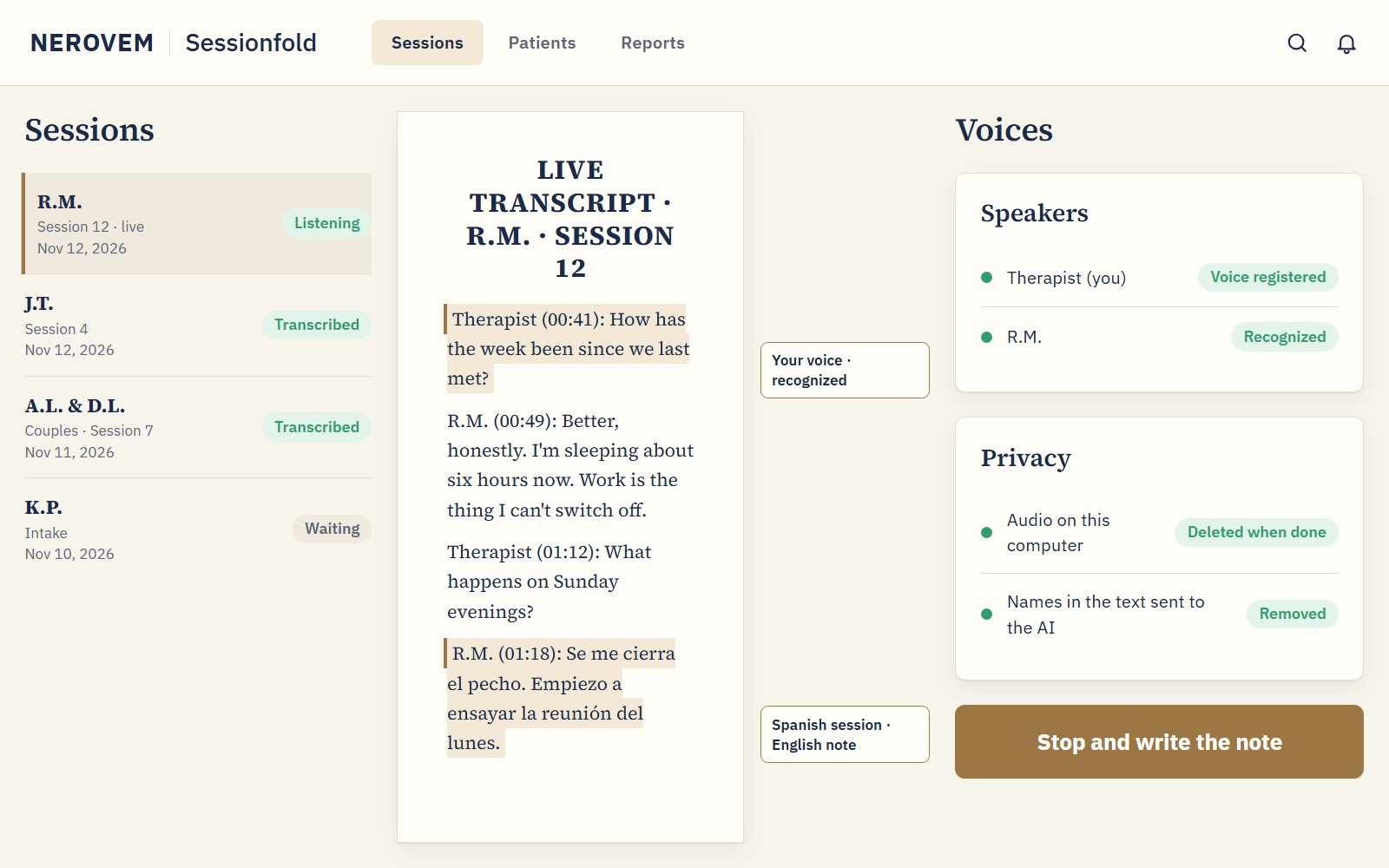
Start Sessionfold in the room or on a video call. It transcribes on your computer and tells your voice from the patient's.
The AI proposes the diagnosis. You approve it.
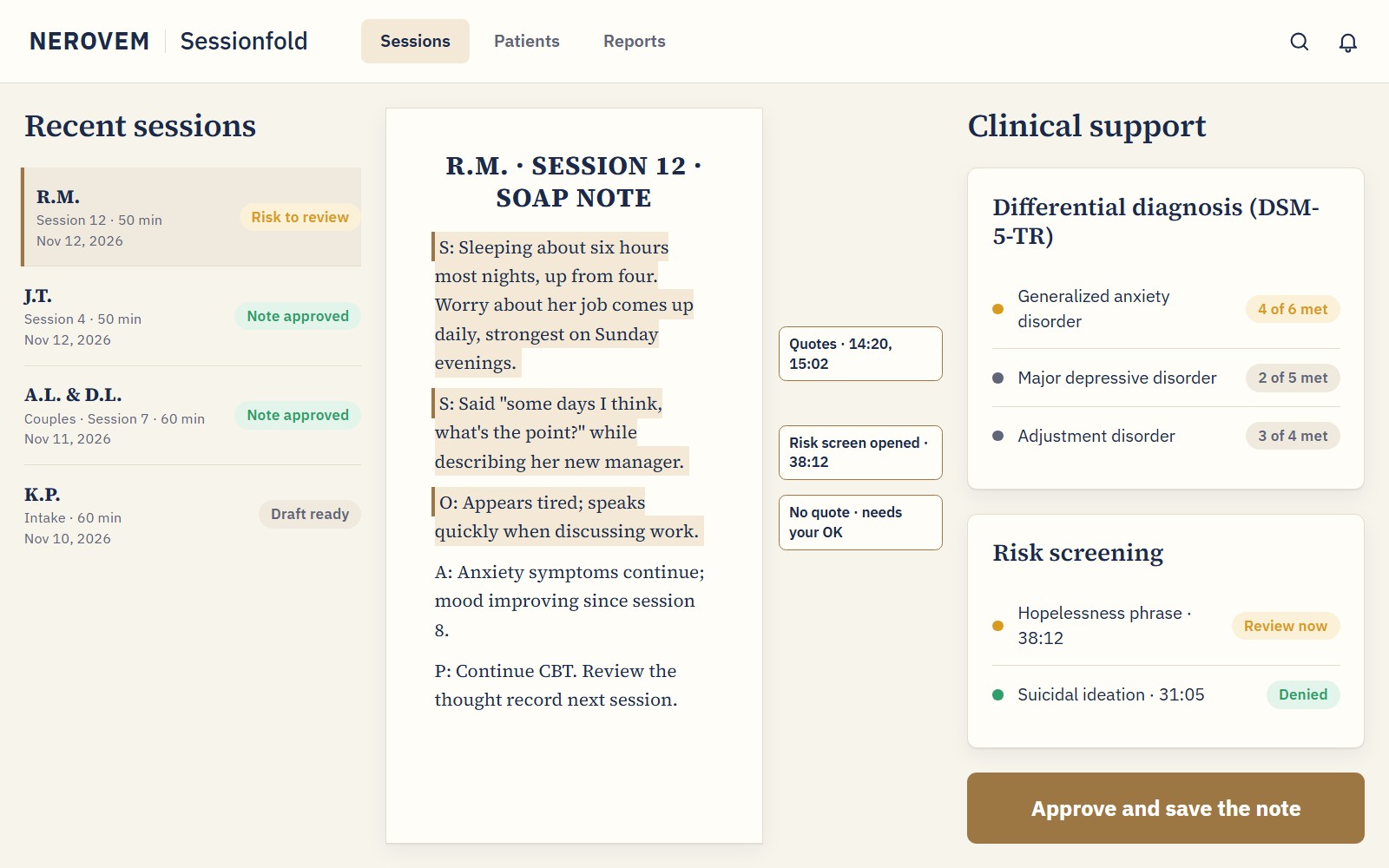
A clinical program for Windows and Mac that listens to the session, proposes the diagnosis with its DSM-5-TR criteria, collects the patient's scales, flags risk and drafts the note, every line with its quote.
You will receive the licence and the download link by email once we have received your payment, within 12 hours at most.
What you get
Everything to get it running and paying off.
After a full day of patients you still owe 10–15 minutes of notes for each one, and your evening goes with them. AI note subscriptions charge every month and keep your sessions on their servers. Sessionfold drafts the note on your computer, every line with its proof, and you approve what enters the record.
Notes written from memory at night, the details fading, and a subscription due every month.
A note drafted from the session, every line with its quote, reviewed and approved by you.
Start Sessionfold in the room or on a video call. It transcribes on your computer and tells your voice from the patient's.
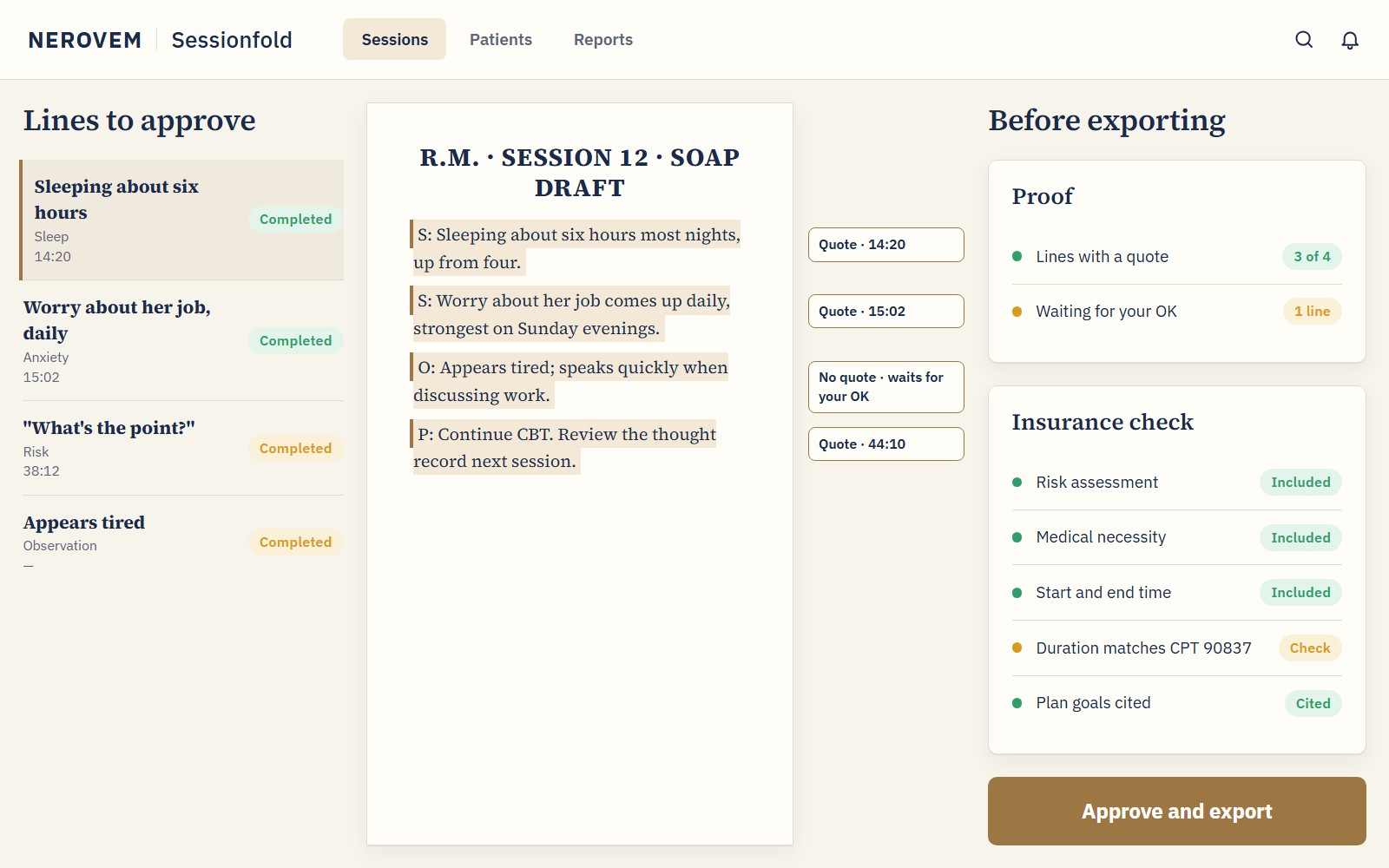
Read the draft: every line shows its quote and minute. A line with no quote waits outside the note until you say yes.
Export the note, plan and scales for your clinical record. The audio is already deleted.
Each line of the note links to the quote and minute of the session. What has no proof is marked and stays out until you approve it.
Your patient speaks Spanish and the note comes out in English, or the language you choose. Built for practices serving Hispanic patients in the U.S.
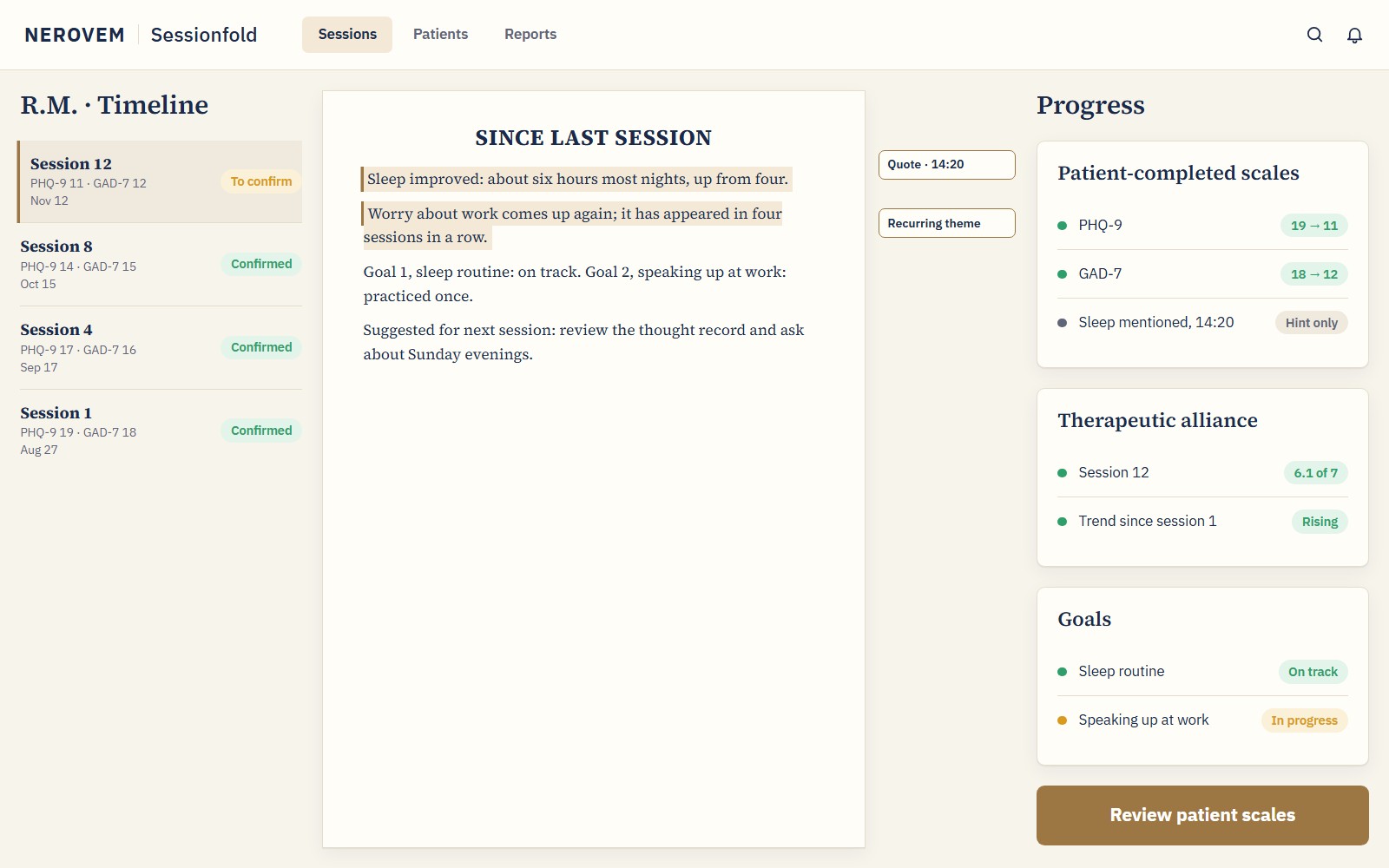
PHQ-9 and GAD-7 in a patient mode, on your computer or a tablet, before or after the session. What comes out of the conversation stays a hint for you, never a score.
Before you export, it checks what is usually missing: risk, medical necessity, start and end times, CPT code and goals. Each gap is flagged.
An alliance score after every session, with the quotes behind it, and the patient timeline with progress by goal.
It is deleted once transcribed. Names and identifying details are removed before the text reaches the AI you chose.
| SessionfoldNEROVEM | AI notes subscription | Writing notes by hand | |
|---|---|---|---|
| Price | $290 once | $39–$120 a month | 10–15 minutes per session: 3–5 hours a week at 20 sessions |
| Where the audio lives | On your computer, deleted once transcribed | On the service's servers | In your memory and your notebook |
| Proof for each line | Every line links to its quote and minute | Varies by service | Your recollection of the session |
| Diagnosis, scales and risk | Differential and risk screening with their quotes; PHQ-9 and GAD-7 completed by the patient | Varies by plan | Scored by hand, form by form |
| Therapeutic alliance | A score after every session, with quotes and trend | Varies by plan | Your own impression, with no record |
| Insurance note check | Flags what is missing before export: risk, medical necessity, times and CPT code | Varies by plan | Rereading the note with the list in your head |
| Spanish sessions | Note in English or the language you choose | Varies by service | Translating and writing by hand |
| AI cost | Your own key, paid to the provider by use, or local mode | Included in the plan | None |
AIf you use it in your business
≈ $470– $1,440
a year
It costs less than two months of the cheapest subscription we compared.
What you don't pay over a year of a subscription AI notes assistant: from $39 a month ($468 a year; Upheal AI Notes, choosingtherapy.com, 2026) to $119.99 a month ($1,440 a year; Mentalyc Super, trytwofold.com, 2026). Your AI key costs extra (cents per session, depending on the provider). Those subscriptions include their own cloud and chat support; here everything stays on your computer and you review every note.
Source: choosingtherapy.com, Upheal pricing (2026) · trytwofold.com, Mentalyc plans (2026, third-party) · AI key cost per session: depends on the providerBIf you install it for your clients
Each sale: Set up Sessionfold in another therapist's practice · you charge ≈ $250 · it costs you ≈ $100
As a consultant or clinical supervisor, you charge $250 to install it in a colleague's practice, adapt their note templates and consent form, and train them (assumption); it costs you 2 h at $45 and ≈ $5 of AI tests with their key. Your colleague buys their own licence: you charge for your work. Costs = what each sale costs you × sales + the licence (and any reusable kit), once. Your time is already paid at $45/h inside the costs.
Estimates with the assumptions in plain sight, not promises: your numbers depend on your business, your area and your prices. Profit before taxes, without subtracting client acquisition, payment fees, travel (unless stated), warranties, support or servers. 1,000 sales is a theoretical scale, not a forecast: it would need staff and structure not counted here.
Your details: the email for the licence and the system you will use it on. We write to you right away to confirm them.
One license, two ways to use it
You charge for your clinical work, not for copies of the software.
You will receive the licence and the download link by email once we have received your payment, within 12 hours at most.
What happens after you pay
And get your invoice straight away.
Your licence and download link arrive by email.
Support and updates included.
No. The installer is one click and there are three steps: hold your session, approve the note, paste it into your record. A guide walks you through getting your AI key.
$290 once, with no subscription. The AI is your own key from OpenAI, Anthropic or Google, paid separately to the provider by use, usually cents per session. 100% local mode costs nothing per use and needs a more powerful computer.
The audio stays on your computer and is deleted once it is transcribed. Names and identifying details are removed before the text goes to the AI you chose, with your own key. Pick a provider that signs a BAA, or use local mode and nothing leaves your computer. Review your own requirements with your compliance advisor.
The AI proposes, you decide. Sessionfold lists the diagnoses to consider with each criterion marked met or not met and the quote behind it. You approve or discard each one, and only what you approve enters the note.
The patient completes them in Sessionfold's patient mode, on your computer or a tablet, before or after the session. The score is theirs. What Sessionfold picks up from the conversation appears separately, as a hint for you, and you decide what to do with it.
Yes. You talk with your patient in Spanish and choose the language of the note, for example English for your clinical record. Every line of the note stays linked to the original quote and its minute, so you can check it says what was said.
Every line links to its quote and minute in the transcript. A line with no quote is marked and stays out of the note until you approve it. You read before anything is saved.
Yes. You export the note, plan and scales from Sessionfold and paste them into your record, whichever system you use.
Yes. You can install it for as many practices as you want and charge them what you decide for your work, for example setting it up on their computers. What you cannot do is sell or hand over the program itself: copies, downloads or the installer for someone else to install on their own. You charge for your work, not for copies of the software.
Windows 10/11 and Mac (macOS 13 or later, Apple Silicon). Updates are included, with no fees.
Write to us and we reply within 48 working hours.
please@nerovem.com