1
Set your rules
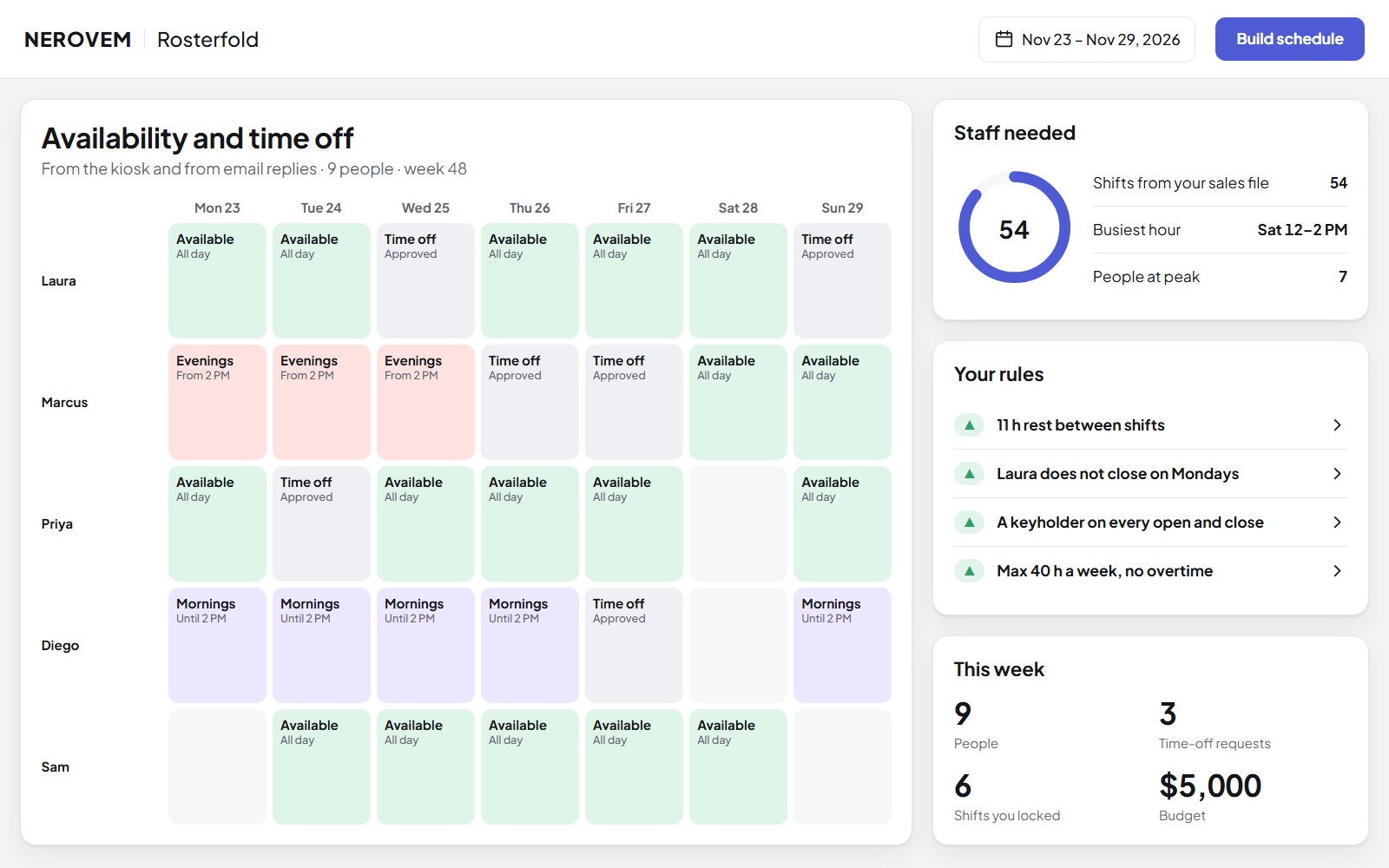
Add your team, positions, availability and rules like “Laura doesn't close on Mondays”, in plain words or from a list.
A schedule that explains every shift
A program for Windows and Mac that builds your weekly shift schedule in seconds and shows why each person is on each shift.
You will receive the licence and the download link by email once we have received your payment, within 12 hours at most.
What you get
Everything to get it running and paying off.
Building the schedule in Excel and chasing replies by message leaves one change breaking the rest, and subscription apps charge $2.50–$9 per employee each month, so the bill grows with your team. Rosterfold fills the schedule in seconds, gives the reason for each shift and warns you of any broken rule before you publish.
A spreadsheet, a pile of messages and a swap that undoes three other shifts.
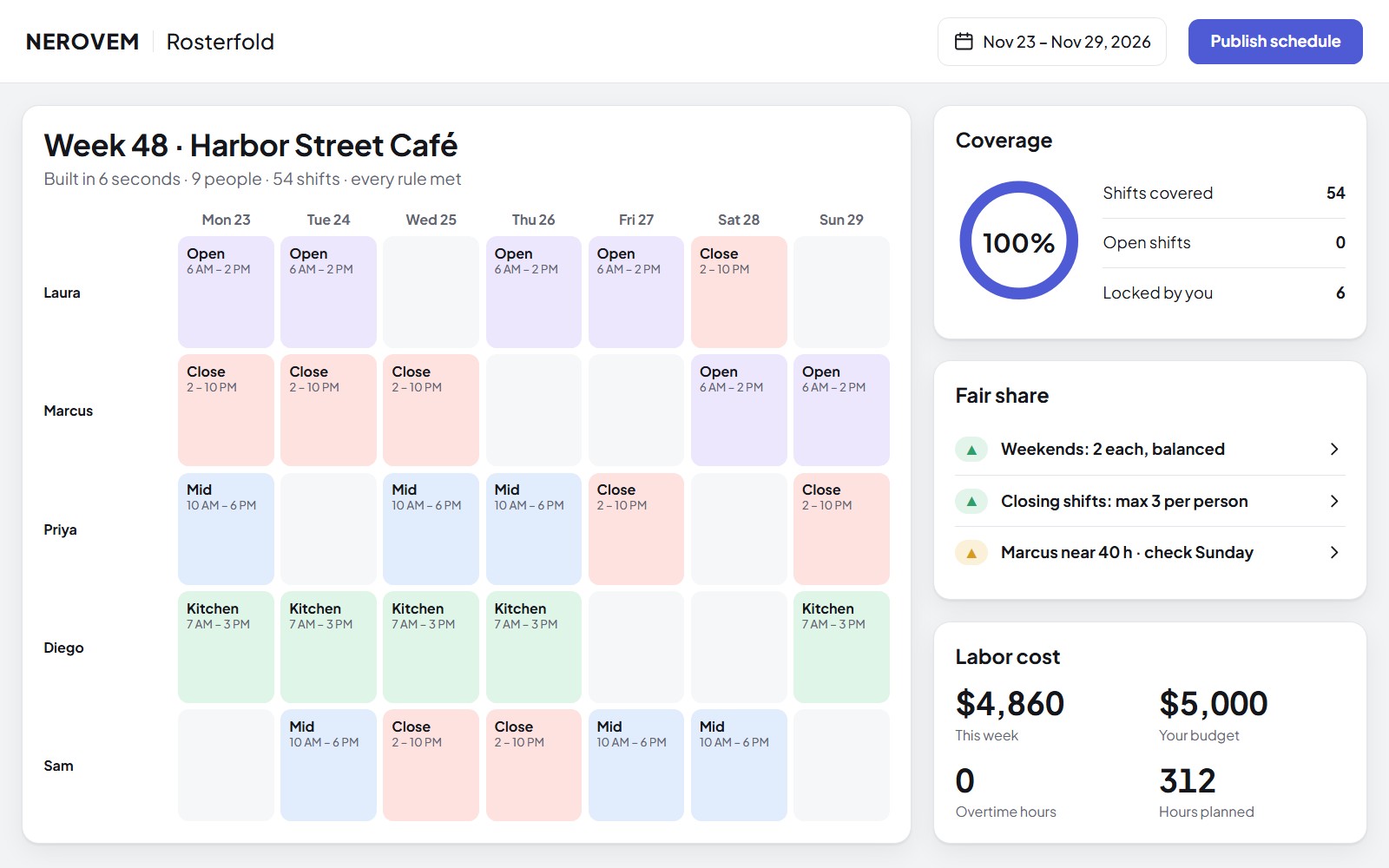
A full schedule in seconds, each shift with its reason, sent to every employee's email and calendar.
Add your team, positions, availability and rules like “Laura doesn't close on Mondays”, in plain words or from a list.
The week fills in seconds. Each shift shows its reason, and any broken rule is flagged before you publish.
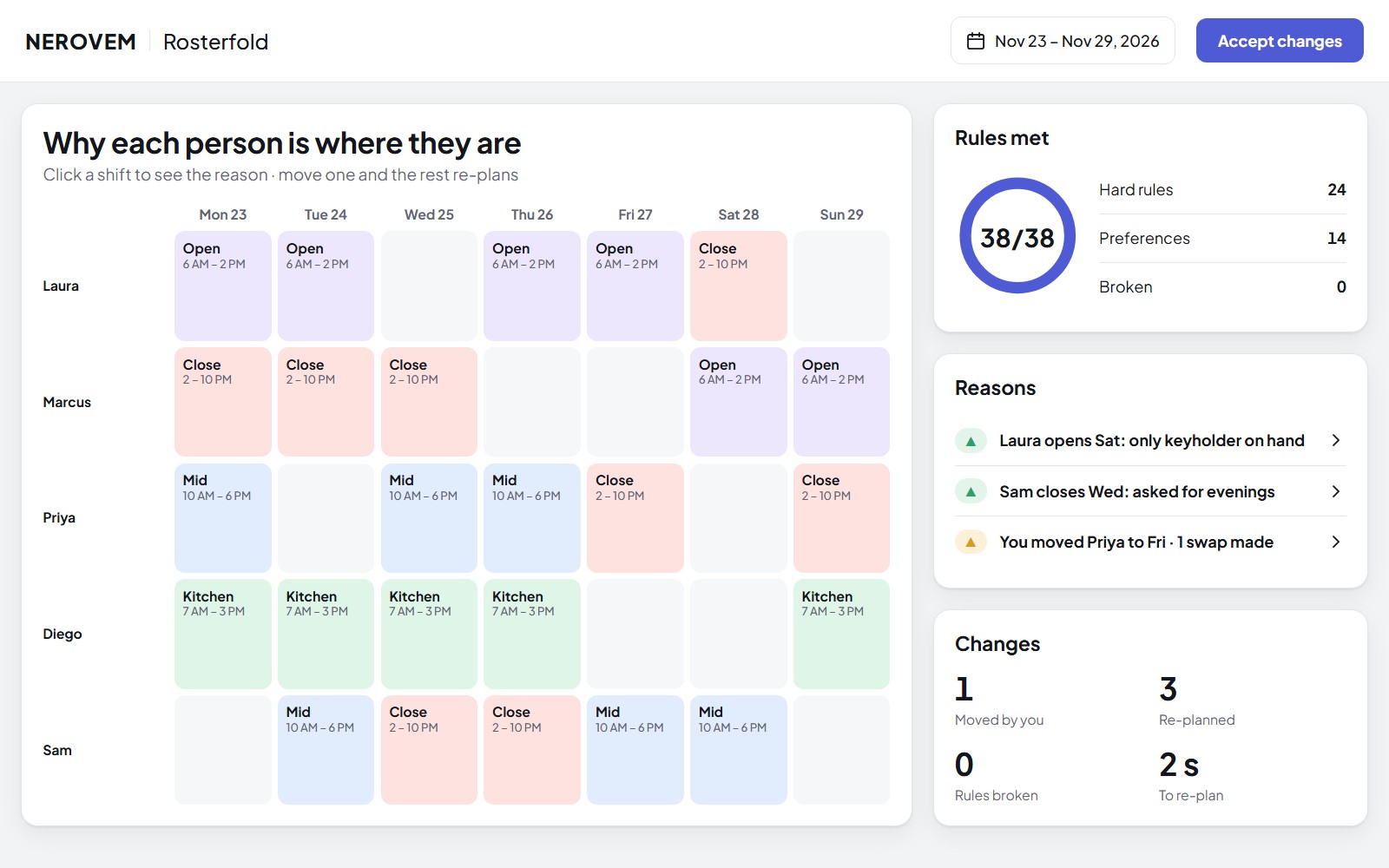
Each employee receives their shifts by email, in their calendar and as a PDF, and clocks in with a PIN at the kiosk.
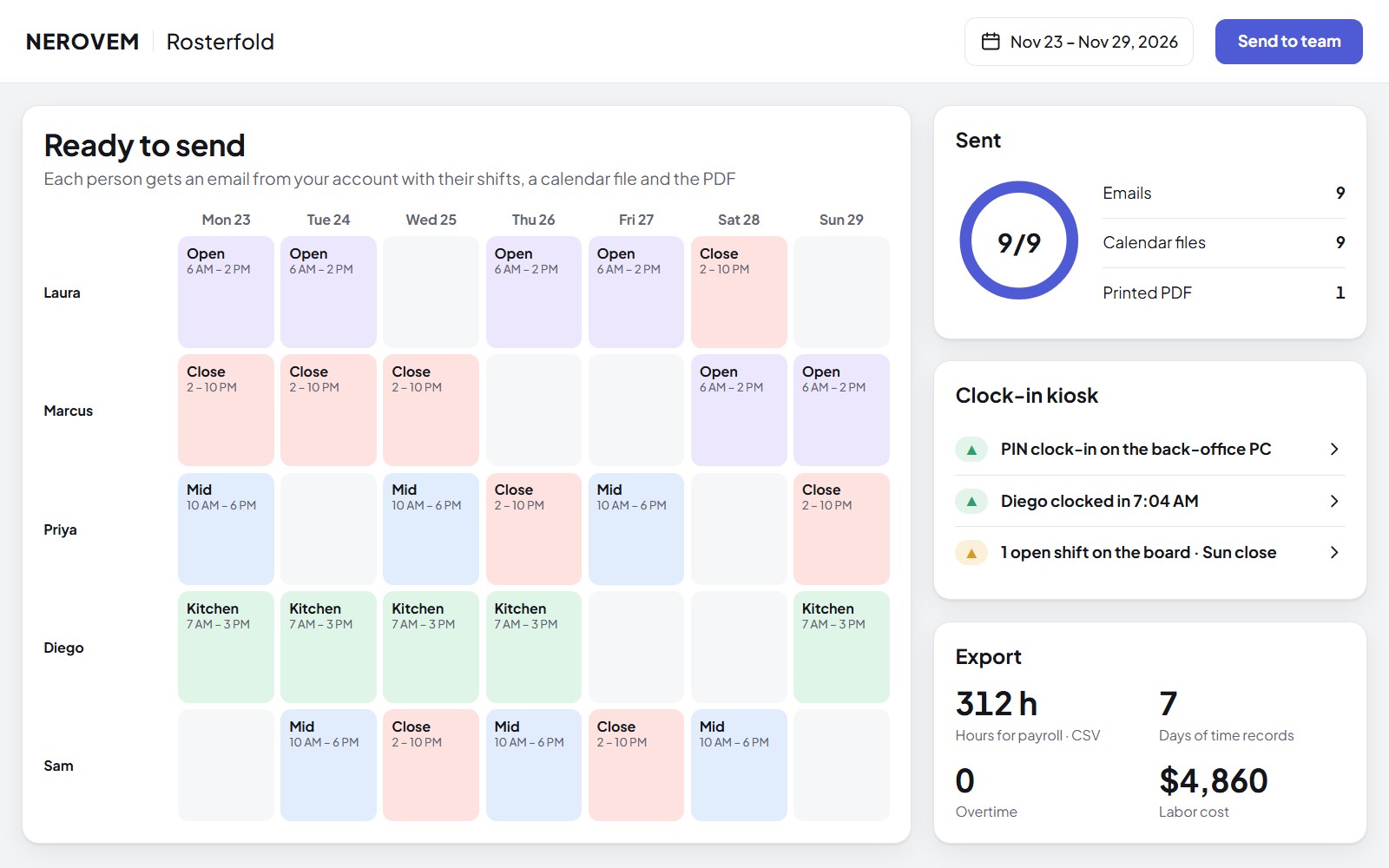
See why each person is on each shift, and get a warning for any broken rule before you publish.
Write “Laura doesn't close on Mondays” and it becomes a rule. Your own AI key is optional; a list works too.
Shifts you pin by hand stay put. Move one and the others re-arrange in seconds.
A counter per person shares weekends, closings, nights and holidays evenly.
See payroll cost against your budget, with overtime alerts, before you publish.
| RosterfoldNEROVEM | Scheduling subscription | Spreadsheet and messages | |
|---|---|---|---|
| Price for 15 people, per year | $249 once | $450–$1,440 a year | Your hours every week |
| Automatic schedule with reasons | Yes, each shift explained | Varies by plan | Built cell by cell |
| Where your data lives | On your business computer | In the service's cloud | In your own files |
| Cost if your team grows | The same $249 | More every month, per employee | More hours of work |
| Mobile app for employees | Shifts by email and phone calendar | Yes, its own app | Messages and printouts |
AIf you use it in your business
≈ $450– $1,440
a year
It costs less than two months of a shift app for 15 people.
What you don't pay over a year of a subscription shift app for a 15-person team: $2.50–$8 per employee a month ($450–$1,440 a year; dupple.com and agendrix.com, 2026). If your team grows, that fee grows; the licence doesn't. Those apps include an employee mobile app; here your team gets the schedule by email and in their phone calendar.
Source: dupple.com, best shift scheduling apps (2026) · agendrix.com, scheduling software pricing guide (April 2026)BIf you install it for your clients
Each sale: Set up Rosterfold with a client business's rules · you charge ≈ $300 · it costs you ≈ $140
As a payroll or HR adviser, you charge $300 to load a business's rules, roles and staff, set up the clock-in kiosk and train the manager (assumption); it costs you 3 h of your time (assumption: $45/h internal cost). The business buys its own licence: you charge for your work. Costs = what each sale costs you × sales + the licence (and any reusable kit), once. Your time is already paid at $45/h inside the costs.
Estimates with the assumptions in plain sight, not promises: your numbers depend on your business, your area and your prices. Profit before taxes, without subtracting client acquisition, payment fees, travel (unless stated), warranties, support or servers. 1,000 sales is a theoretical scale, not a forecast: it would need staff and structure not counted here.
Your details: the email for the licence and the system you will use it on. We write to you right away to confirm them.
One license, two ways to use it
You bill for your work, and every client is included.
You will receive the licence and the download link by email once we have received your payment, within 12 hours at most.
What happens after you pay
And get your invoice straight away.
Your licence and download link arrive by email.
Support and updates included.
Rosterfold lives on your computer. Employees get their shifts by email and in their phone's calendar, and the calendar file updates if a shift changes. They can ask for days off and swaps by replying to the email or at the kiosk. Subscription apps do offer their own app; here the phone's calendar does that job.
Each person gets an email from your business account with their shifts, a calendar file and the PDF. If a shift changes, they get an automatic email. You can also print the PDF for the notice board.
Employees clock in with a PIN at the kiosk on the same computer or another computer in your premises, through a shared folder. There is no fingerprint, camera or location. Every change is logged, and you export the daily record per person and the hours as CSV for payroll or your accountant.
It includes starter rules you adjust to your state or agreement: federal and California overtime, the 14-day notice of predictive-scheduling laws and 12 hours between shifts in Spain. You review and edit them, and the final call is yours.
No. Without AI you choose rules from a list. If you want to write them in plain words, add your own AI key: it costs cents a month, paid to the provider.
Install it like any program on Windows 10/11 or macOS 13 or later. It costs $249 once, with updates included and no fee per employee. Payroll is not part of it: it exports hours for yours.
Yes. Create one team per location, each with its own positions and rules, on the same license.
Yes. You can install it for as many clients as you like and charge what you decide for your work: setup, rules, weekly planning. What you cannot do is sell or hand over the program itself: copies, downloads or the installer for someone else to install on their own. You charge for your work, not for copies of the software.
Write to us and we reply within 48 working hours.
please@nerovem.com