1
Pick your playbook
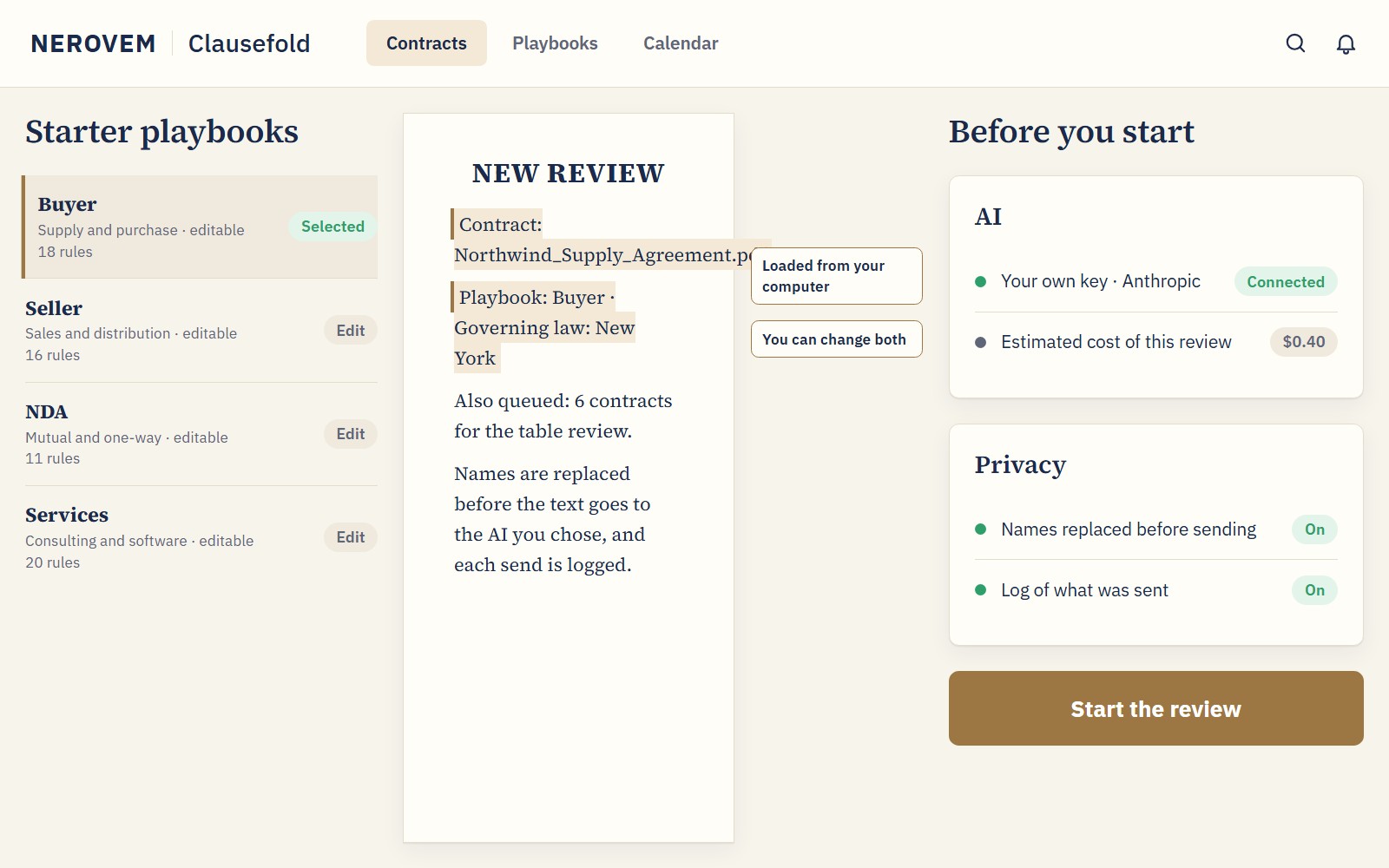
Choose one of the 4 starter playbooks or your own, set the governing law and drop in the contract.
Every flagged clause, quoted from the contract
A program for Windows and Mac that reviews contracts against your own playbook, each finding with its exact quote, each change yours to accept.
You will receive the licence and the download link by email once we have received your payment, within 12 hours at most.
What you get
Everything to get it running and paying off.
Reviewing a contract by hand takes 1–3 hours, and AI tools for lawyers charge $160–$550 a month per user. Either your evenings or your budget pays. Clausefold marks every clause against your playbook, each finding with its quote, as a draft for you to review.
Clause by clause, copy and paste into a redline, 1–3 hours per contract, or a subscription due every month.
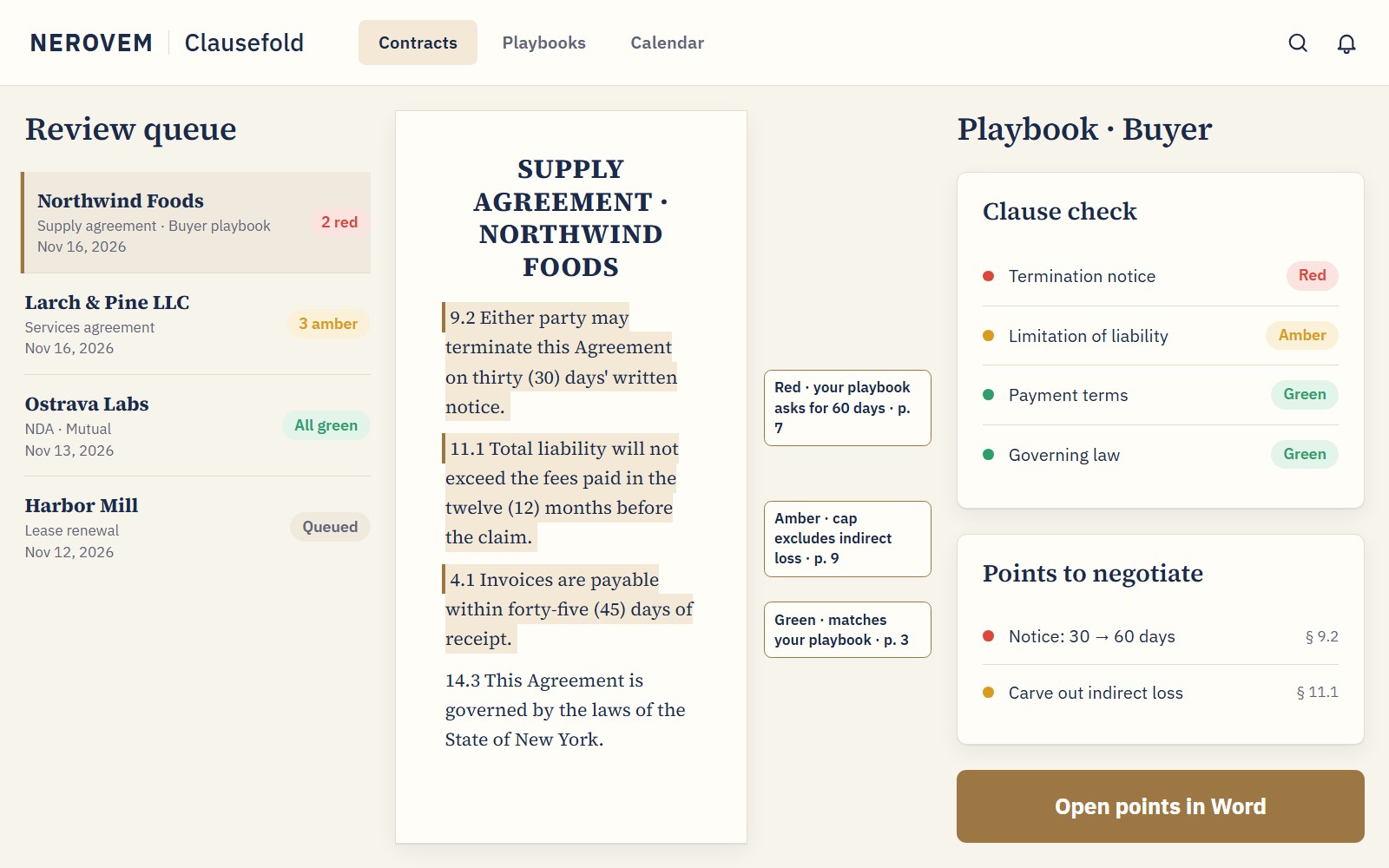
Every clause marked green, amber or red with its quote, and changes you accept one by one in Word.
Choose one of the 4 starter playbooks or your own, set the governing law and drop in the contract.
Each clause turns green, amber or red with its exact quote. Proposed wording arrives as tracked changes in Word.
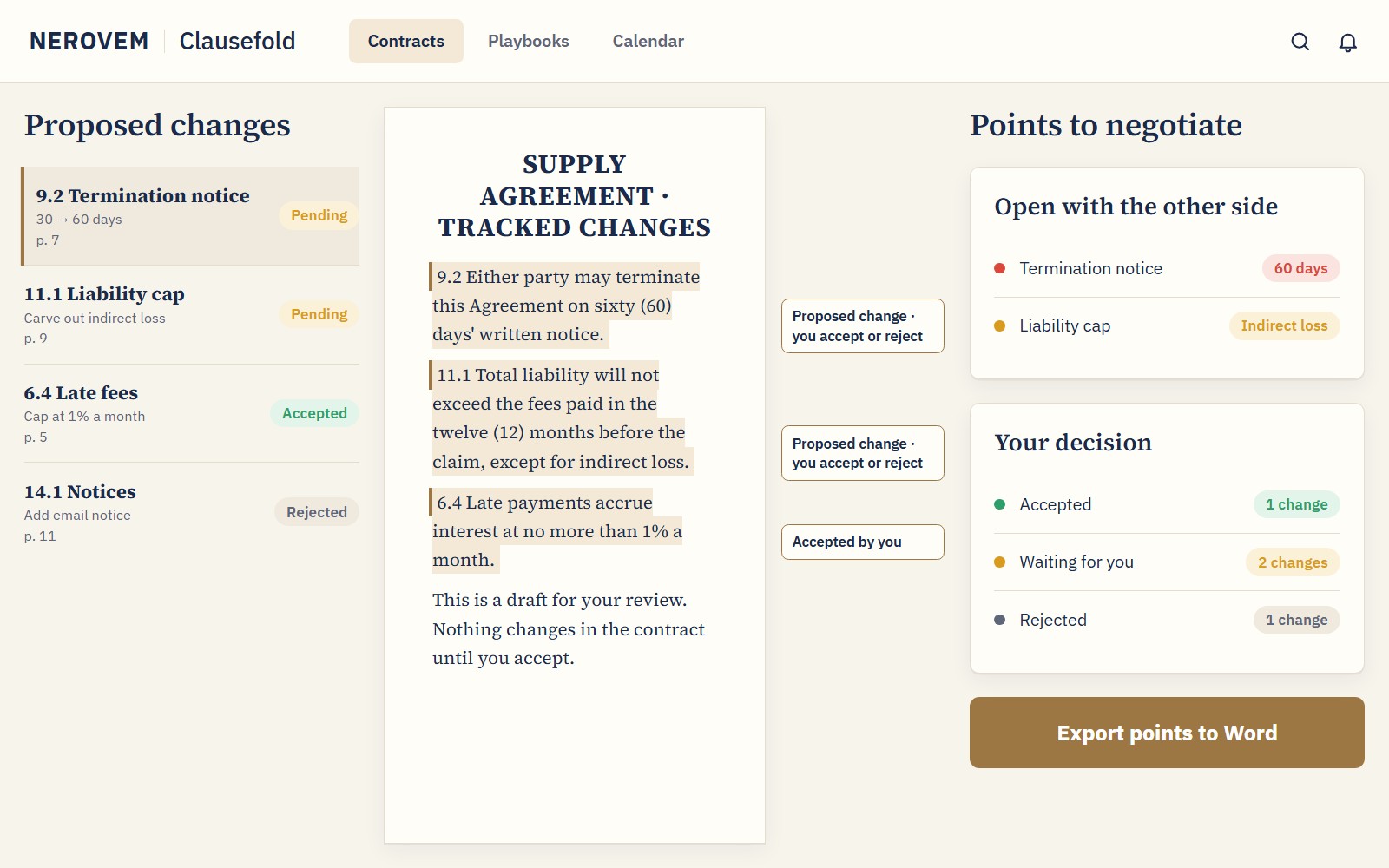
You accept or reject every change. The points to negotiate open in Word, a draft for you to review.
Each green, amber or red flag shows the exact words of the contract. One click takes you to the clause.
Alternative wording appears as tracked changes in Word, plus a list of points to negotiate. You accept every change.
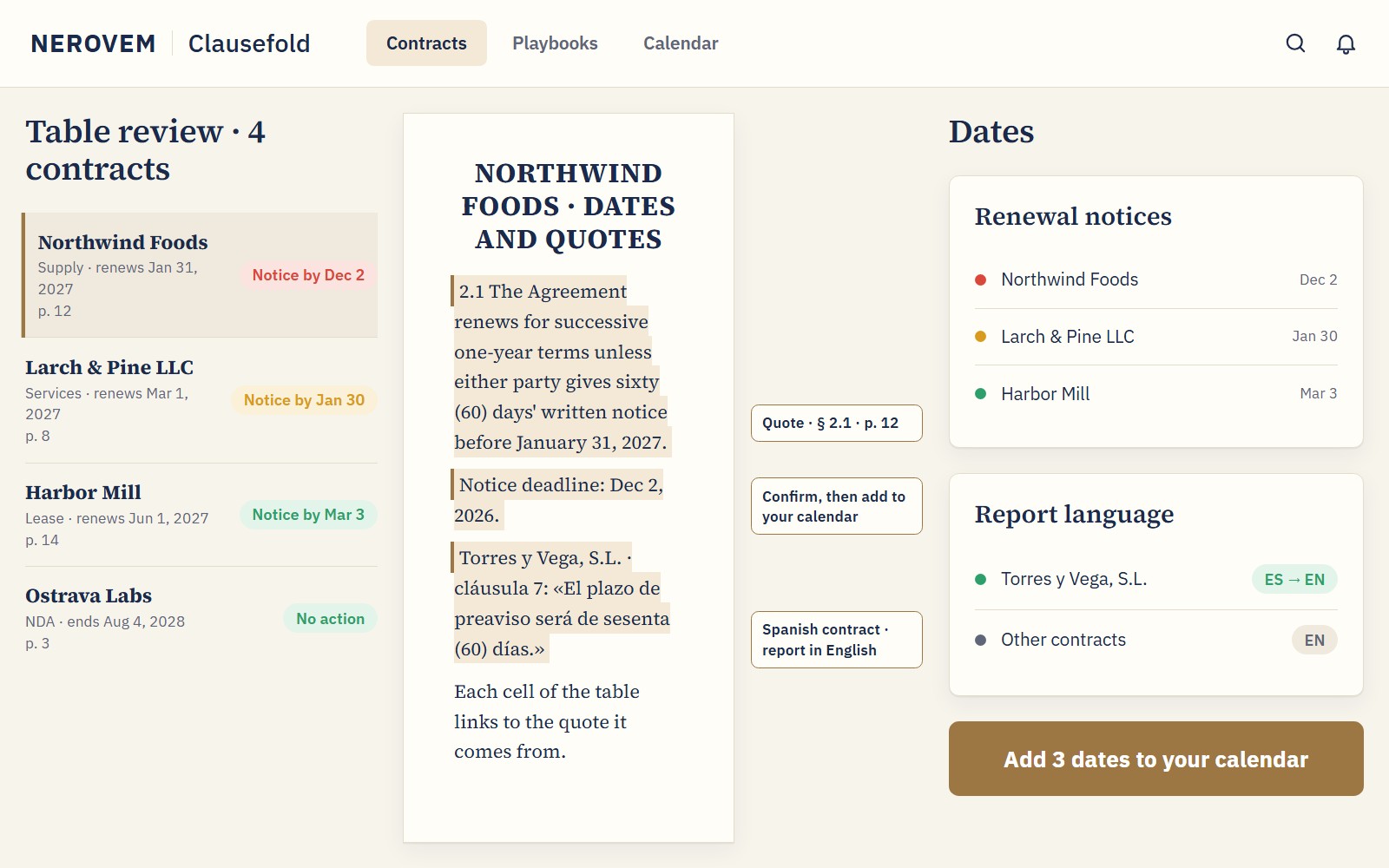
One row per contract, every cell with its quote. Renewal dates and notice deadlines go to your calendar.
Review a contract in Spanish and read the report in English with the original quote beside it, or the other way round.
Names are anonymized before the text goes to the AI you chose, and a log shows everything that was sent.
| ClausefoldNEROVEM | AI legal subscription | Doing it by hand | |
|---|---|---|---|
| Price | $490 once | $160–$550 a month per user | 1–3 hours per contract |
| Where your documents live | On your computer; the text goes to the AI provider you choose, or to none in local mode | In the service's cloud | In your own folders |
| Proof for each finding | Every finding links to its exact quote | Varies by service | Your own reading, clause by clause |
| Changes in Word | Tracked changes you accept or reject | Varies by plan | Typed one by one |
| Many contracts at once | One table, a row per contract, a quote in every cell | Varies by plan | One contract at a time |
| AI cost | Your own key, paid to the provider by use, with an estimate for each review, or local mode | Included in the plan | None |
AIf you use it in your business
≈ $1,920– $6,600
a year
It costs less than two months of the cheapest subscription we compared.
What you don't pay over a year of a subscription AI contract review tool: from $160 a month per user ($1,920 a year; gavel.io, 2026) to $550 a month ($6,600 a year; LegalOn individual plan published in June 2026, per gc.ai). Your AI key costs extra (from cents to a couple of dollars per contract, depending on the provider and length). Those subscriptions include their own cloud and support; here your documents are stored on your computer and you accept every change.
Source: gavel.io, Gavel Exec pricing (2026) · gc.ai, legal AI tools (2026, third-party; individual plan published June 2026) · AI key cost per contract: depends on the providerBIf you install it for your clients
Each sale: Set up Clausefold with a client company's playbook · you charge ≈ $750 · it costs you ≈ $190
As a lawyer or adviser, you charge $750 to turn a company's negotiation positions into its playbook, install it for its legal team and train them (assumption); it costs you 4 h of your time (assumption: $45/h internal cost) and ≈ $10 of AI tests with their key. The company buys its own licence: you charge for your work. Costs = what each sale costs you × sales + the licence (and any reusable kit), once. Your time is already paid at $45/h inside the costs.
Estimates with the assumptions in plain sight, not promises: your numbers depend on your business, your area and your prices. Profit before taxes, without subtracting client acquisition, payment fees, travel (unless stated), warranties, support or servers. 1,000 sales is a theoretical scale, not a forecast: it would need staff and structure not counted here.
Your details: the email for the licence and the system you will use it on. We write to you right away to confirm them.
One license, two ways to use it
You bill for your legal work, and every client is included.
You will receive the licence and the download link by email once we have received your payment, within 12 hours at most.
What happens after you pay
And get your invoice straight away.
Your licence and download link arrive by email.
Support and updates included.
$490 once, with updates included and no subscription. The AI is your own Anthropic, OpenAI or Gemini key, paid to the provider by use: expect from cents to a couple of dollars per contract, and Clausefold shows the estimated cost of each review. Local mode costs nothing per use.
That decision is yours, as it is your professional duty. Your documents are stored on your computer. The text goes to the AI provider you choose, or to none in local mode. Names are anonymized before it is sent, and a log records everything that was sent. Check your bar's guidance and your provider's terms; for sensitive matters, use local mode.
Yes, with Ollama. You need a computer with 32 GB of RAM and a recent graphics card. Reviews carry somewhat less detail than with a cloud AI, so many lawyers keep local mode for their most sensitive matters.
For tracked changes and the list of points to negotiate, yes. The add-in is included, and you accept or reject each change as you would a colleague's edits. The review and the table work on .docx and .pdf files from any folder.
English and Spanish. Review a contract in Spanish and read the report and the proposed changes in English, with the original quote beside each finding, or the other way round.
Yes. Use it on every matter you take and bill your clients for your work: the review, the judgment and the negotiation. Every output is a draft for you to review.
Windows 10/11 and Mac (macOS 13 or later). Updates are included, with no fees.
You will receive the license and the download link by email once we have received the payment, within 12 hours at most. A 10-minute guide walks you through setting up your AI key.
Write to us and we reply within 48 working hours.
please@nerovem.com